
The system
See what your sails are doing — and how to trim them.
Traditional wind instruments show conditions. SailGauge shows the forces on your sails, how your trim compares, and which way to adjust.
How it fits together
A simple system that works with your instruments.
SailGauge sensors, the Master Module, and the optional display connect on your boat's NMEA 2000 network, alongside your existing wind instruments. Phones and tablets connect to the Master Module by Bluetooth.

SailGauge sensors
Force sensors at the sheet blocks of the mainsail and headsail. No moving parts, designed for demanding marine environments.
Master Module
Central processing and system integration. Combines the measured sail forces with your wind data and sends feedback to your displays.
Your display
View SailGauge on a tablet, phone, or the optional sunlight-readable 7" touchscreen display.
Your wind instruments
SailGauge uses your existing wind information alongside the measured sail forces. It complements your instruments rather than replacing them.
What you see
Feedback you can act on.
Instead of interpreting wind data and deciding what to do, SailGauge shows useful information and instructions for reaching the trim you want.
See how an adjustment changes the forces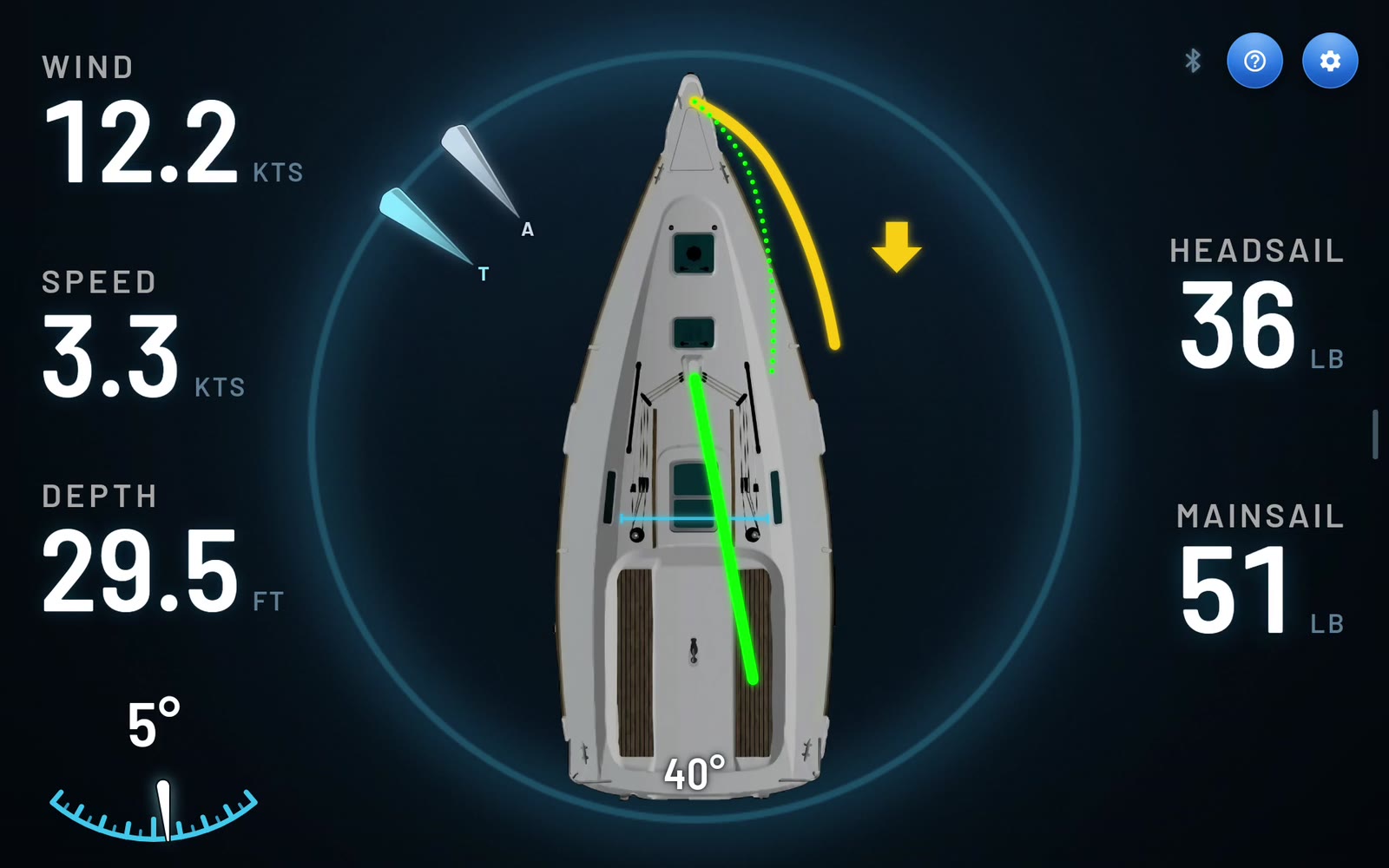
See your sails
- Force from each sail. Mainsail and headsail readouts show the relative forward force from each sail, in lb, kg, or percent of maximum. The effect of changes to sail trim, backstay, or vang can be measured instead of guessed.
- Sail position and trim indication. See where each sail is trimmed now, compared with the best trim for the current wind direction. The indicator shows yellow while a sail needs adjusting and green once it's in trim.
Know what to do
- Trim arrows. Arrows show which way to trim each sail.
- Steering guidance. The navigation circle shows which way to steer to get back to your best trim.
- Animated instructions. For newer sailors, animations show how to trim the mainsail and headsail, and how to respond if the boat goes off course or the wind shifts.
- Audible alerts. Confirm when a sail is being trimmed and warn of changing conditions.
Sail safer
- Warnings before they become problems. SailGauge helps identify trim situations that can lead to trouble, such as conditions for an accidental jibe, or sails that are overpowered and need to be reefed.
Sail your way
- Performance — guides trim for best speed.
- Sport — trades some speed for the thrill of a boat heeled to the rail.
- Comfort — guides trim to reduce heel for a relaxed cruise.
- Phone and tablet apps — see your trim from the helm, the rail, or the foredeck.
Apps and compatibility
Works with your boat and your phone.
The SailGauge apps connect your phone or tablet to the system, so you can see your trim anywhere on deck. The phone app also provides diagnostics and system updates.
- Instrument network: NMEA 2000. NMEA certification pending.
- Wind data: from your existing NMEA 2000 wind instruments.
- Phone and tablet apps: Android phones and tablets, iPhone, and iPad.
- Power: 12 V from your boat.
- Connection to phones and tablets: Bluetooth.
- Mounting: Harken 27 mm CB traveler and genoa car mounts available now. Ask about other hardware.

Put SailGauge on your boat.
See SG1000 configurations, options, and compatibility, or reserve yours today.